
Move around the store
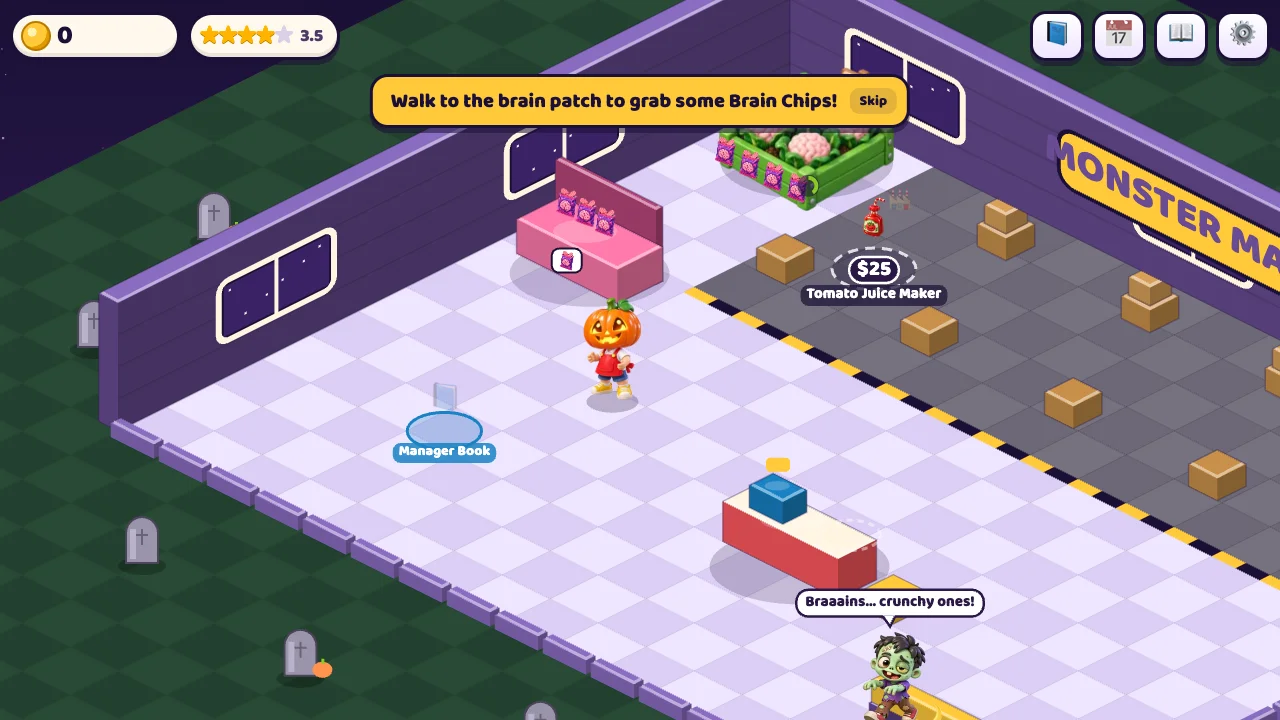
Choose Open the shop. You can move with WASD or arrow keys, tap a destination or drag to use the touch joystick. A short tap is different from a held movement gesture. Actions around sources, shelves and the register depend on where the shopkeeper stands.
The tutorial begins at the Brain Chips source. Follow its highlighted destination instead of visiting every price pad. The isometric view can make a station look closer than its interaction point; if nothing happens, move a little nearer and stop there.
Make your first sale in four stops
- Source: walk to the brain patch and collect Brain Chips. Your starting carrying capacity is limited, so one trip does not empty every source.
- Shelf: carry that product to its shelf and let the stock transfer. Customers need shelf stock, not just products in your hands.
- Register: after a customer picks an item, stand behind the till to perform checkout.
- Cash: visit the cash pile to collect the money. A completed checkout and money in your wallet are separate stages.
Afterward, the tutorial points to a purchase pad for Tomato Juice. Unlocking a source does not automatically build its shelf. Read the price and prerequisite chain before deciding that a new product is ready for sale.
Diagnose the station that is blocking revenue
| Visible symptom | Likely missing action | First response |
|---|---|---|
| Customers wait at an empty shelf. | Product has not reached the shelf. | Collect the right source product and return to that shelf. |
| Shelves have stock, but customers line up at the till. | Checkout is not being handled fast enough. | Stand at the cashier position; consider cashier help when unlocked. |
| Transactions finish, but your wallet seems unchanged. | The cash pile still needs collecting. | Walk to the money pickup point. |
More products create more travel and restocking work. Buying a new shelf while leaving checkout unattended can move the bottleneck rather than solve it. Before expanding again, complete the entire loop once and see where customers spend most of their waiting time.
Hire for the work you cannot keep up with
A cashier supports checkout, a stocker supports shelf supply and a janitor supports cleaning. These helpers unlock through the store's purchase chain. A locked staff pad may require earlier product or shelf purchases; having enough money alone is not always sufficient.
Use the manager desk or book to inspect upgrades. Compare the description with what is currently happening on the floor. Carrying more stock helps trips to empty shelves, but it does not make an unattended register process customers. Decoration is another separate decision and should not be mistaken for hiring.
Check your save before a long expansion session
The game saves progress automatically. For a simple continuity check, collect some cash, note your wallet and purchased pads, return through the game menu and reopen in the same browser. The Settings panel also offers export and import save controls. Keep an exported save when you want a backup before moving browsers.
Private browsing and deleting site storage can remove local progress. Offline income is a game feature with limits and staffing dependencies, so leaving a tab closed should not be treated as unlimited earning time.
Is Monster Mart a cooking game?
It is mainly a movement and retail-management game. You transport and sell products rather than prepare a recipe. Compare it with Boba Lab and Pup Spa if you prefer precise counter actions or pet treatments.