
Open the spa and read one request
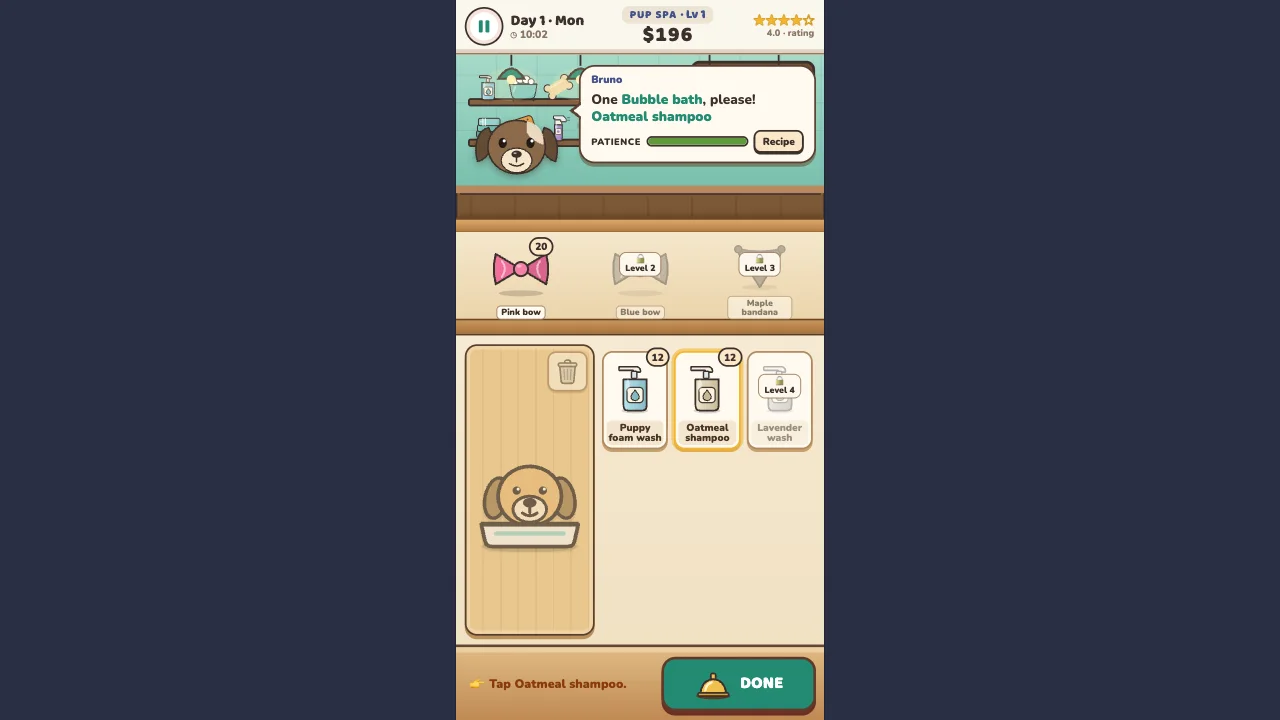
Choose Open the spa!. The first day begins with bath supplies and a small selection of accessories. Customers are the pets themselves, including dogs and cats. Follow the current ticket rather than applying every item visible on the counter.
Read the requested wash and accessory, then select the matching item. A pink bow and a shampoo are different parts of a treatment. Locked supplies show their required level; a locked option is not a button you need to force for an early guest. The active treatment step tells you which tool to use next.
Use the tool, not rapid random clicks
| Tool step | Action | What to watch |
|---|---|---|
| Scrub | Rub the foam pad | Progress and the pet's mood. |
| Rinse | Hold the shower control | Finish the rinse without ignoring fidget warnings. |
| Brush | Use long, slow strokes | Careful movement is more useful than frantic scrubbing. |
| Dry | Control dryer heat | Keep it in the comfort band. |
| Trim | Follow the dotted guide | Accuracy and calm both influence quality. |
Later services unlock more of these actions. Their presence in this reference does not mean all five tools appear in the first order. On touch screens, the tool pad and calming action can use separate fingers; on a mouse, alternate deliberately instead of losing control by rushing.
Respond to the warning before a wiggle
The mood meter changes while you work. A warning ! precedes a fidget. Tap TREAT during that warning when available, or slow down and stroke the pet gently. Treats are limited within a step and have a cooldown, so repeatedly pressing the button is not a reliable plan.
Working through a wiggle drains mood more quickly. If mood reaches zero, the pet hops out and the treatment loses progress. Tool accuracy alone is therefore not enough for the best quality: calm contributes to the final score as well.
For your first treatment, aim for three habits: finish only the requested step, notice the first warning, and pause rapid movement when the pet becomes restless. Compare that result with your next guest while keeping the same careful rhythm.
Finish the guest before planning the next day
Use DONE when the ticket steps are complete. Read the response and quality result before switching attention to another pet. Supplying the requested item matters even if a different accessory looks nicer.
The shop also has stock and crew decisions. At the morning management screen, check which supplies you consumed and which services are available. Buy what supports your current menu rather than spending all cash on a newly visible accessory. As treatments grow more involved, crew can help with service, but you still need to understand the tool action you are performing.
Common first-day mistakes
- Choosing by color alone: compare the item label with the request before tapping.
- Ignoring the mood bar: a nearly finished tool step can still go badly if the pet is too upset.
- Spending treats immediately: leave yourself a response to an actual warning.
- Assuming every guest wants a bath: later services have different steps, supplies and controls.
Continue on the same browser
The game saves shop progress through its game save system. For an easy first check, finish a guest, return through the game's menu and reopen on the same browser. Private browsing, clearing site data or changing devices can affect local continuity; do not treat a local save as a guaranteed cross-device backup.
Is this a real pet-care tutorial?
No. Its tools, mood and treats are game mechanics. For another service loop, compare the shop management collection or try the Boba Lab guide.