

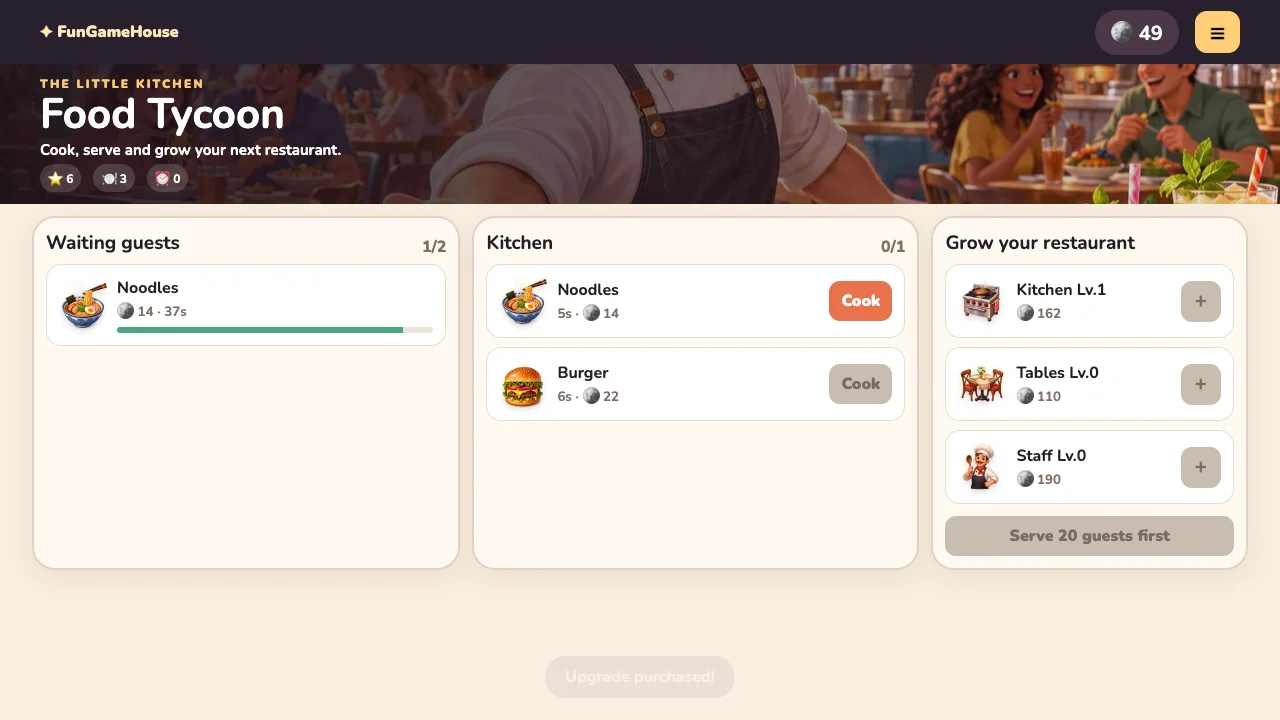
Complete the first order
- Press Open the kitchen. A guest arrives with a dish request and a patience countdown.
- Find that dish in the kitchen list and press its enabled Cook button.
- Watch the cooking progress. The serve button is disabled while the dish is cooking.
- Press Serve as soon as the dish is ready and its guest is still waiting.
The opening restaurant offers noodles and burgers. The first three guests get extra patience to help you learn. Once that opening period ends, the pace is less forgiving, so treat those first orders as practice for reading and completing a request without hesitation.
Understand the two separate queues
The Waiting guests counter measures customer capacity, while the Kitchen counter measures cooking slots. Initially you can have two waiting guests but only one dish cooking. A disabled Cook button can mean there is no matching order, the kitchen is full or enough matching dishes are already preparing.
For example, if a burger is cooking while a noodle customer arrives, repeatedly tapping Noodles will not create a second cooking slot. Serve the ready burger, then start the noodles. If the noodle guest is close to leaving, consider that deadline before starting another long task.
A finished dish is not automatically a completed order when you have no staff. You must serve it. If the matching guest leaves first, the game removes the unusable preparation; cooking everything as soon as possible is therefore not the same as serving successfully.
Choose an upgrade for an observed bottleneck
| Upgrade | Behavior in this version | Consider it when |
|---|---|---|
| Kitchen | Shorter cook times; an extra cooking slot at every second kitchen level. | Requests regularly wait behind a busy cooking slot. |
| Tables | More guest capacity and additional patience; arrival timing also changes. | The waiting area is full or guests leave too quickly. |
| Staff | Automatically starts an eligible waiting order and serves completed dishes; also supports offline earnings. | You need help with the repetitive cook-and-serve loop. |
The first kitchen upgrade costs 85 coins in this version. Starting cash is 70, so serve successfully before buying it. At Kitchen Lv.1, cooking becomes faster but the kitchen still has one slot; Lv.2 is the first additional slot. This distinction prevents expecting a second pot immediately after your first purchase.
Upgrade prices increase with levels. Compare the visible cost and your actual missed-order pattern before buying. A bigger waiting room can create more work for a kitchen you have not expanded yet.
Use a repeatable busy-shift routine
Scan waiting guests, check for ready dishes, serve those first, then fill available cooking slots with matching requests. Avoid spending your whole attention on the upgrade panel while an active guest's countdown is running. The game's management view can pause the active loop while you inspect upgrades; resume when ready.
Fast service can earn better rewards and stars. A good beginner target is a handful of completed orders with fewer missed guests, rather than a promised coins-per-minute figure. Dish mix, upgrades and remaining patience affect the result.
Open a branch only when both requirements are met
The next restaurant needs enough coins and enough served guests. At the first branch gate, the interface asks you to serve 20 guests. New branches unlock additional dishes, so their cooking times and workload differ from the opening noodles-and-burgers kitchen. Opening a branch also clears the current orders and preparations.
Quick questions
Why is Serve unavailable?
The dish may still be cooking, or its matching guest may have left. Check the cooking bar and waiting list together.
Which cooking game is more hands-on?
Aniki Ramen uses ingredient selection and a held pour. Food Tycoon focuses on matching requests, timed preparation and upgrades. Compare them in the cooking collection.